We all recall a few years ago when, like most other businesses, campgrounds needed to adapt to a pandemic that threw a monkey wrench into what had been business as usual. Campgrounds actually fared that crisis fairly well, when the public embraced camping as the second safest activity to a self-imposed home quarantine.
Today, a new crisis is impacting small businesses, including campgrounds, in more ways than ever would have been imagined, except this one has originated in the White House rather than a wet market in Wuhan. Ignoring the increase in prices of foreign imports and supplies that need to be purchased, campgrounds are dependent upon the influx of tourism, a greater and greater percentage of which has originated internationally in recent years.
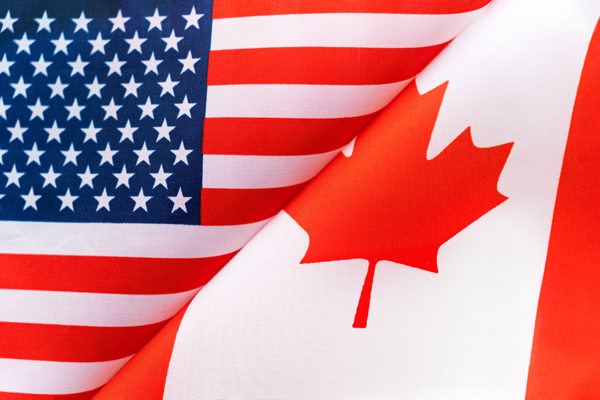
In northern states in particular, campgrounds have historically depended upon a significant percentage of guests coming in from Canada. Years ago, there was actually a campground in New Jersey named Wildwood Canadian Campground (and another campground with the same name in Ohio), but each of the over 30 campgrounds in Cape May County at the time relied upon and actively marketed to and embraced Canadian tourists, primarily from Quebec, who reliably flocked to the Southern New Jersey shore each summer. There were occasional complications, such as the initial spike in fuel prices and unfavorable fluctuations in the currency exchange rates, but nothing compared to the imposition of tariffs and highly offensive comments about Canada being made the “fifty first state”.
As I write this in April of 2025, international tourists are changing their plans to avoid travel into the United States. After border enforcements, such as a Canadian woman who was detained by ICE for two weeks after her visa was revoked, have led to the detention of travelers, several countries – including Canada, Germany, the United Kingdom, France, Portugal, Finland and Denmark – have issued warnings and advisories against travel into the United States, while there are other voices calling for a total boycott of travel into the country. Sadly, the United States has joined countries such as Pakistan, Guatemala, Nicaragua, Honduras, Colombia, Egypt and Bangladesh where foreign departments of state are warning their citizens to reconsider travel to the United States, the equivalent of the U.S. State Department’s level 3 travel risk. It is only slight consolation that the United States is not included in the level 4 “do not travel” list of extremely dangerous countries such as Russia, Iran, Iraq, Afghanistan, Venezuela, Ukraine and North Korea.
Tourism Is Big Business
Canada has historically sent over 20 million visitors across the border in recent years, our single largest partner in tourism, with Mexico a close second. According to the US Travel Association, even a 10% reduction in Canadian visitors will translate into an economic loss of over $2 billion and the loss of 14,000 jobs in the tourism industries. This comes at a time when even our domestic travel is forecast to decline by 1.4%, according to Tourism Economics, due to weaker economic growth and decreases in disposable income and purchasing power. Overall, spending by international visitors generated $2.9 trillion in economic output in the United States in 2024, supporting 15 million jobs. When these visitors choose new destinations in 2025, they may enjoy the experiences and choose not to return to the United States, even when the political landscape ultimately changes, an indication of the long-term impact of shortsighted thinking.
Compensating for Loss of Business
In the meantime, when life gives you lemons, make lemonade. Although you may want to directly contact recent Canadian guests whom you had previously expected to return in 2025 (and who have not already cancelled their reservations), even that personal outreach is unlikely to be effective when it is countered by what is perceived as a much broader hostility on the part of the United States government. You will also want to exercise an extraordinary degree of flexibility in dealing with cancellations in these instances, in an attempt at maintaining long-term goodwill. Our Canadian friends and neighbors still love the United States and the American people, but their reputation for tolerance has been pushed beyond the breaking point, with former Prime Minister Justin Trudeau recently urging Canadians to vacation at home. The highly-respected Canadian Geographic magazine has recommended 11 Canadian equivalents for vacation-at-home substitutes for the most popular U.S. tourist destinations, including Toronto’s CN Tower for New York’s Empire State Building, Alberta’s Banff and Jasper National Parks for Wyoming’s Yellowstone National Park, and even Old Quebec City for San Juan, Puerto Rico.
One of my company’s clients, the owner of a campground in Vermont, told me that Canadian tourists normally account for about 15% of his bookings but that he would consider himself lucky if they account for even 2% in 2025. Another client, the owner of a campground in New Hampshire, has catered to the Canadian tourism market over the years, with 80 to 85% of his guests coming from over the border. The impact upon his business is clearly going to be catastrophic. Historic Canadian tourist destinations such as Old Orchard Beach (Maine), Hampton Beach (New Hampshire), Cape Cod (Massachusetts), the Wildwoods and Cape May (New Jersey), and Virginia Beach (Virginia) are all going to feel the pain.
Fortunately, unless they are strictly stopovers between two destination points, most campgrounds consist of a combination of transient and seasonal sites, with monthly stays somewhat of a hybrid of the two, often appealing to temporary workers, people who are in the process of building a home nearby, and short-term emergency services providers. With maximum occupancy, transient sites are far more profitable, while seasonal sites provide a steady and reliable income in times of less than full occupancy. Most sites can be adapted to accommodate either type of guest and, if a sudden loss of anticipated transient business comes into play, it makes sense to promote and actively pursue a compensating number of monthly or seasonal guests.
With that in mind, my company has successfully simplified and streamlined that process for several of its clients, where a new customized form has been added to their websites, independent of the usual short-term reservation forms. The form starts with a comprehensive list of rules that apply to long-term guests, followed by arrival and departure dates, full applicant information (including the upload of a photo of each adult’s driver’s license) that will be used for background checks, a list of additional occupants, pet details, full information on the applicant’s RV (including the upload of a photo), essential contact information, and an agreement that is bound by a digital signature.
There are effective ways to make the best of a bad situation, and now is a time for creativity in order to maintain occupancy levels and keep your business profitable during these challenging times.
We have all seen them, disguised under a number of names: processing fees, service charges, or – probably the most offensive of all – “convenience” fees. Whatever you want to call them, your customers universally and understandably resent them. No business should set out to intentionally irritate its customers, and junk fees will in many instances backfire, eventually preventing the finalization of sales.
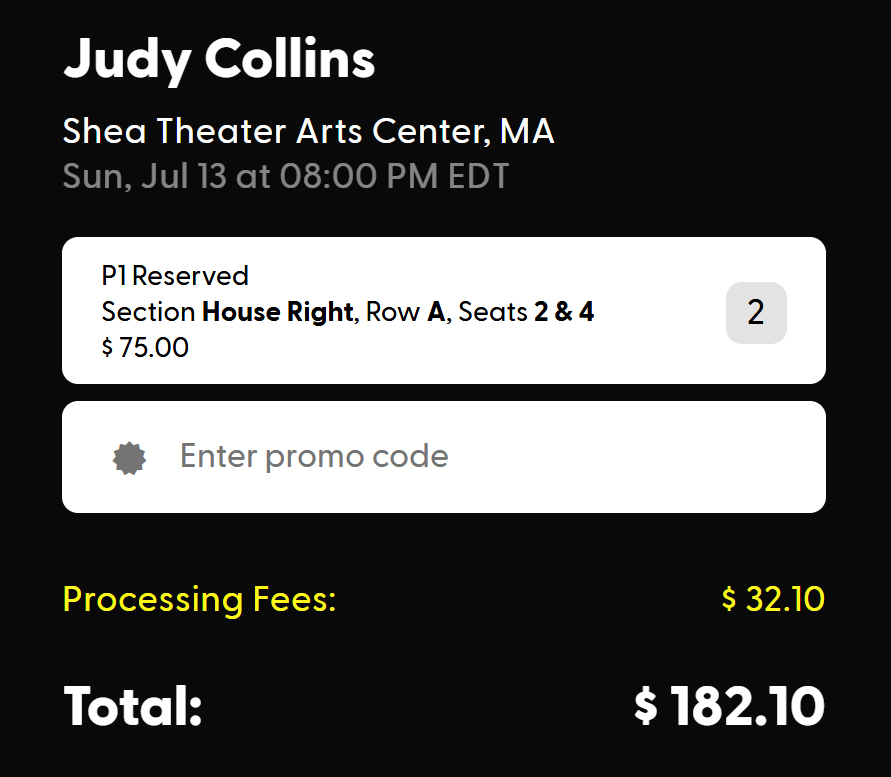
The airlines and online ticket vendors for sporting events and concerts have been notorious for their abuse of add-on junk fees, inflating the actual prices for their services. Serious attempts at controlling these fees in the interest of consumer protection were made during the Biden administration, but consumer interests are being thrown out the window under the second Trump administration, as evidenced by the dismantling of the Consumer Financial Protection Bureau. The status of either the laws or their enforcement does not affect consumer attitudes, where nobody likes to feel that they have been “ripped off”. As an example, tickets went on sale recently for an upcoming concert at a small nearby venue. I was willing to pay $75.00 each for front row reserved seats; however, the $32.10 in “processing fees” was outrageous and killed the sale. Maybe somebody else paid the fees and the concert will be sold out, but there is a point where all potential customers will say “enough is enough” and where seats will go empty and business will be impacted.
From a business owner’s perspective, it is always important to control and account for costs. If the prices that you charge do not exceed your costs of doing business, your business will not be profitable and will sooner rather than later fail. All the costs that come into play in your company’s accounting and tax preparation must be covered. These include your costs of labor, insurance, vehicle expenses, infrastructural improvements, repairs and maintenance, taxes and licenses, legal and professional services, mortgage payments, interest on loans, depreciation, supplies, and other expenses. Those other expenses for businesses these days now include credit card processing fees and the fees charged by your reservation services provider.
For a campground, all those costs of doing business come into play when determining the cost of an overnight campsite or rental. You will understandably charge more for a 50-amp full hookup site than you do for a primitive tent site, taking into account not only the costs of the infrastructure but also the anticipated utility usage. That is an example of building the costs of doing business into your price structure, and your customers understand and fully accept the concept. On the other hand, let’s say that you purchase a new fleet of vehicles or build a new on-site manager’s residence. Your guests would never accept a surcharge on top of your usual fees for that added overhead. Unless you want to discover the threshold where your customers “just say no”, you will build those expenses into your basic price structure along with every other cost of doing business.
With that in mind, I do not understand why so many campgrounds think that their customers will find it acceptable to pay add-on fees for online reservations or their use of a credit card, which is usually the only way to pay for an online reservation. The campground industry works diligently to position itself within a more upscale environment, comparable to other segments of the lodging and travel industries, hence the embrace of the “outdoor hospitality” moniker. Well, if you have stayed at a major hotel chain or booked a cruise, with few exceptions you have not been charged a fee for use of a credit card when making your reservations. A notable exception is Carnival Cruise Line which imposes a credit card surcharge of 1.1% for use of Visa or MasterCard or 2.75% for use of American Express for direct booking through their website or call center (with no surcharge for debit card payments). Hilton Hotels is also said to be exploring the concept of credit card fee surcharges. The bottom line is that getting away with charging these fees does not make the practice the right thing to do or something that customers find acceptable. Adding these credit card surcharges is actually illegal in Massachusetts, Connecticut, California, and Puerto Rico; however, many merchants and merchant associations have circumvented the intent of the laws by offering so-called “cash discounts”. Simply because something is legal does not make it right. Do you want summary statements to be given to your guests at the time of checkout looking like the typical monthly utility bill, with line after line of vague surcharges? We are living in difficult times for consumers, and my advice is that this is no time to play games with loyal customers but rather a time to treat them with the respect that they deserve.
Many small businesses spend a considerable amount of money on search engine and social media advertising. In some instances, this money is well invested; however, there are many times when precious dollars are simply flushed down the drain. It is always important to track your advertising to see where it truly produces results that far exceed the cost of the ads themselves. With so many responsibilities and wearing so many hats, many people turn to “experts” to guide their expenditures, a decision that can be not only costly but outrageously expensive. Nobody is better prepared to watch your dollars than you are yourself, and the person who initiated an unsolicited contact has only one divergent interest, and that is to maximize their income, not yours.
With that in mind, it is wise to consider some of the alternative ways of getting your name and message in front of the eyes of prospective customers. One sure way is through the use of vehicle graphics. Vehicle graphics and wraps have become really inexpensive in recent years. As recently as 20 years ago, it was commonplace to hire a talented airbrush artist to physically paint a vehicle with a unique design, a variation of what has been known as an “art car”. Prior to that, vehicles were usually hand-painted and lettered using stencils or decals. Today, designs are digitally created and printed on oversized sheets of adhesive vinyl that are carefully applied, with proofreading virtually eliminating the chances of an error appearing on the sides of a vehicle. More commonly, these graphics have become complete vehicle “wraps” that colorfully convey a company’s advertising message.
Particularly for the drivers following you down the highway, your business name on the back of your vehicles is a truly inexpensive way of spreading the word. In fact, if you are driving a distance down an Interstate highway, you may want to consider setting your cruise control to a couple miles per hour below the speed limit, allowing a greater number of vehicles to pass you and absorb your message during your trip. According to the Outdoor Advertising Association of America, a vehicle driven 15,000 miles in the course of a year will pass or be passed by 9,000,000 other vehicles and might have 50,000 ad impressions per day. Of course, these impressions per mile will vary wildly, based upon the volume of traffic upon a vehicle’s most commonly travelled routes. For example, your message will reach more drivers on an Interstate highway in a crowded metropolitan corridor than it will being driven on rural back roads. Either way, the same OAAA studies show the 80% of consumers can recall details about a vehicle wrap after seeing it only once, with the rate of recall increasing significantly after multiple exposures.
Given those statistics, it is important to craft your message as carefully as possible, where as simple as possible is generally the best approach. We have all seen vans driving down the road, typically owned by some sort of contractor, where the sides are covered by dozens or even hundreds of words of text that outline every type of work that the company provides. Recall on those? Close to zero. Think of the big companies whose trucks we most frequently see driving down the highways, and the simplicity of the effective messages that they convey. Their goal is recall of their company’s names and conveyance of a positive impression.
Amazon: The Amazon wordmark, its yellow swoosh, and “There’s more to Prime. A truckload more.”
UPS: Whether the “package car” making a delivery to your home, or a semi-trailer driving down the highway, the only embellishments are usually the distinctive UPS logo on a brown background.
Walmart: The company logo and “Save Money. Live Better.”
Target: The iconic logo, “EXPECT MORE. PAY LESS.”, and “Bullseye” – the official mascot bull terrier.
All this effort goes to waste and can totally backfire if a vehicle that displays your business name is being driven in a haphazard manner. The town where I live is a notorious speed trap, where the radar guns on the police cars do not seem to have an “off” button. The speed limit in the center of town is 25 miles per hour, unless the light is flashing on the school zone sign, when the speed limit is reduced to 20 miles per hour. I vividly recall being pulled over and ticketed by a part-time police officer whose position was funded by a state grant, about 20 years ago for going 32 miles per hour in the 25 mile per hour zone. That temporary worker is now the town’s chief of police, and folks in town know to take that speed zone seriously, especially now that it passes the new public safety complex where the police department is headquartered.
Anyway, a few years ago, I pulled out of my road heading toward the center of town, doing exactly the signed speed limit: 40 miles per hour, then 30 miles per hour, then the 25 mile per hour zone. Well, all this time, a truck that was barreling down the highway tailgated me into the center of town, until I turned into the bank parking lot and the driver of the truck displayed an obscene gesture. Well, not only will I never hire Mr. Gutter to repair the gutters and downspouts on my house, I called the company to let the owner be aware of his driver’s behavior. Just this past week, while driving in a nearby town, I noticed a delivery truck breeze right through an intersection with a four-way stop, then make a turn on a commonly used shortcut route that is prominently signed “No Trucks”. It was 5:30 in the evening, and perhaps the driver was behind schedule and only paid until 5:00 o’clock. I sent Fly By Night, a local furniture retailer, an email outlining my observation. I have received no response, but you can be sure that the company will never be making a furniture delivery to my home. These are two examples of how the advertising message on your vehicles can backfire and do more harm than good.
On the other hand, I was simply approaching a crosswalk, also in the center of town and in that 25 mile per hour speed zone, earlier in the week. There have been many instances when I have witnessed 7 or 8 vehicles failing to stop for a pedestrian in that crosswalk; however, in this most recent instance a semi-trailer that I did not expect to come to a stop yielded for me so I could cross the road. Kudos to the Big Y Supermarkets, whose graphics covered that vehicle, for employing at least one courteous driver who did the right thing!
You may have the best of intentions, but a low-level employee can ruin your efforts. Yes, there can be name recognition, but it will not necessarily lead to an increase in business. Take measure to ensure that your messages and business visibility lead to positive outcomes.
Particularly during election seasons, we are frequently presented with highly negative political campaign advertising, speeches and social media posts. It is a sad reflection upon the times we live in that so many candidates feel the need – or find it easier – to attack their opponents rather than to highlight their own capabilities, records, and positions on relevant issues. Most of us would welcome a return to civility and an abandonment of mud-slinging. The same applies to advertising consumer oriented businesses.
Comparative advertising has been around for nearly a century – from a campaign in the 1930s when Walter Chrysler encouraged comparison of his new Plymouth automobiles to similar models built by Ford and General Motors – to the presidential campaigns of 2024. In the interim, we have all witnessed battles for market share between cigarette brands (before broadcast advertising of cigarettes was banned in 1971), along with the so-called “cola wars”, “burger wars”, and battles for supremacy between Chevy and Ford full-sized pickup trucks. (I own a GMC Sierra pickup truck, but I was never swayed by advertising, only by previous bad ownership experiences with Ford trucks.) Comparative advertising is rarely successful, except in some instances where it represents a “David” taking on a “Goliath”, and even then, it can often lead to either counterattacks or lawsuits. All in all, the approach just does not make sense. It makes even less sense when a business declares war upon itself.
A Campground Changes Ownership
I recently encountered a campground that had changed ownership and was taking a rather inexplicable marketing approach. I will not identify the business by name; however, the new owners changed the name from “XYZ Campground” to “XYZ Resort & Campground”. Most of us know the difference between a Walmart and a Walmart Supercenter, with one not pretending to be the other. Adding the word “resort” to a business name is not a magic wand that transforms a business overnight. Like “supercenter”, the term implies a much higher standard than simply a name change.
There are valid reasons for rebranding, often accompanying changes in ownership. I have covered this topic at length in the past. Rebranding is often undertaken when a business had earned a negative reputation under former owners, had a name that was easily confused with one or more unrelated businesses with similar names, or had a name that was too closely identified with the personal name(s) of the previous owners. Even then, there are exceptions. Bob’s Discount Furniture was founded by Bob Kaufman, with a single store in Newington, Connecticut back in 1991, after previously selling waterbeds out of multiple locations. Now owned by Bain Capital, there are 150 stores in 24 states. The chain retains the Bob’s Discount Furniture name and even retained Bob Kaufman as its commercial spokesperson for several years, now replaced by the “Little Bob” mascot that is modeled after the original Bob, complete with jeans and yellow polo shirt. Bain Capital knows better than to tamper with success.
In the instance of “XYZ Campground”, the new owners built a new website at XYZresort dot com, while maintaining the original website at XYZcampground dot com, with content that was no longer updated other than a “new ownership” statement on the original site’s Home page. This resulted in two websites competing against one another for SEO, with the old site understandably owning SEO priority. This has certainly been a cause for confusion among potential guests. Making matters worse, the new website referred to the park as a formerly “once forgotten … old, worn-down campground”. Not only was that not a positive marketing strategy, it was an example of a business waging a comparative advertising war against itself!
When I checked in early September of 2024, links and traffic to the old website still existed on several important websites, including Go Camping America, Bing Maps, The Dyrt, RV Life Campgrounds, and the park’s local tourism marketing organization. At minimum, it would have made sense to have the old website redirect to the new URL, but the new owners did not see the wisdom or logic of that. Instead, they have opted to allow the hosting and domain name registration of the original website to simply expire in about a month. There are instances where a domain name has been inadvertently lost for a variety of reasons, and the resulting nightmares can include having the domain – which will continue to generate traffic – become the latest URL for pornography or online gaming with Korean text and graphics. To voluntarily allow a domain to expire is both beyond rationality and a dream come true for a business’s competitors. Think twice before you put your business in this situation … or pay the price.
On a trip to Pennsylvania back in 2022, when I had hoped that the prices of automotive fuel had reached their peak, I think everybody in America had become all too familiar with the term “pain at the pump.” To add insult to injury, all three of the vehicles that my wife and I owned and drove at the time were diesels. Those turbo diesels are highly fuel-efficient, and we drove my car, which gets 45 miles per gallon on the highway. We saw diesel prices on the side of I-78 as high as $6.099 per gallon, and I considered myself lucky to fill up at $5.199 on the return trip, using a discount card at a convenience store chain in Scranton. Afterward, one of those diesels was replaced with a plug-in electric hybrid version of the same model.
Even if the price of fuel settles a bit, two things are clear: One is that more and more campers will want to turn to either seasonal camping or incentives where they will be allowed to leave their campers on-site between weekends. The other is that campgrounds are going to be seeing more and more electric vehicles (EVs) as time goes on … and this time will be much sooner than expected. This is a market that smart campground owners will cater to, not discourage.
Few campgrounds prohibit pets because that would decimate their potential pool of campers. Instead, they allow pets and have appropriate rules and associated fees. On the same token, campgrounds should welcome drivers of EVs. I have seen some campgrounds that either foolishly prohibit EVs or charge fees that are far in excess of the actual electric usage costs of charging. On a pre-pandemic vacation in California, I rented a Tesla and went out of my way to favor restaurants and other businesses with charging stations.
If you are seeking to attract new campers, consider the statistics. According to the manufacturer, Tesla globally built and delivered nearly 1,850,000 vehicles in 2023, which represented a 35% increase in numbers over 2022, admittedly leveling off a bit from the statistical increases in prior years. Compare that with 750,000 Ford F-Series pickups sold in 2023, the best-selling vehicles in America, of which nearly 25,000 were the F-150 Lightning EV that is designed for towing a camper. F-150 Lightning competitor, Rivian Automotive, delivered over 50,000 units of its R1S and R1T models during this same year, doubling its production from 2022. The Tesla Model Y is estimated to have sold over 385,000 units in the United States in 2023, with sales only bested by the Big 3 pickups and the Toyota RAV4. The other Tesla offering at the lower end of the line’s price scale, the Model 3, is estimated to have sold over 232,000 units. If you are not impressed by those statistics alone, bear in mind that nearly every automobile manufacturer in the world is currently selling one or more EV models. Sales may have recently turned slightly sluggish, but they are only going to continue to increase in the long term.
Can Your Park Handle the Load?
Before you think that EV charging is going to dim your lights and blow your circuit breakers, bear in mind that you have probably already upgraded your electrical infrastructure to accommodate big rigs with multiple air conditioning units that can draw tens of thousands of watts of power during the course of the day. When charging using a level 2 charger, a typical EV will consume a steady amount of power of about 7,000 watts and 32 amps, unless it is plugged in at a level 3 DC fast charging station from Tesla, Electrify America, EVgo, ChargePoint, or another provider (which will deliver a fast charge at 96,000 watts and 200 amps). The expectation will be the lower charging rate that most EV users will also experience at home using a level 2 charger. On the other hand, a single air conditioning unit in a big rig might use 3,200 watts and 27 amps at startup, then settling down to about 1,200 watts and 10 amps. Power hogs such as microwave ovens will consume their power in surges. If your park has 600-amp service and is already equipped with 50-amp pedestals, you or your electrician can do the math to determine how many EVs can be charging at any one time, along with what you can charge their owners for their use of the service and what they are willing to pay, keeping in mind that EV owners are used to paying 20 to 30 cents per kilowatt hour at conventional level 2 charging stations and 40 to 60 cents per kilowatt hour at a level 3 charging station. This, of course, varies by state and local utility, where users in North Dakota may pay as little as 12 cents per kilowatt hour and users in Hawaii may pay over 45 cents per kilowatt hour. Most EVs will charge overnight, when temperatures have cooled down and air conditioner and appliance usages are lower.
Talk with your electrical products provider, but an EV and an RV can often coexist on a single 50-amp power pedestal. Back in November of 2021, KOA announced that it was in the process of installing level 2 chargers at KOA parks across the United States and Canada. KOA’s decision was no doubt based in part upon its recent study at that time, which found that one out of five campers owns an EV, significantly higher than the statistics for non-campers and the general public. Sadly, nearly 3 years later, only 26 parks within the entire KOA franchise are listed as having any sort of EV charging facility, and EV charging appears to be specifically prohibited at every other property.
Another option for getting on board is to see if your business qualifies for one or more free charging stations from Tesla. The primary requirements are that your business has a significant volume of drive-in traffic and that you will be willing to provide the electrical work. This could accommodate customers who are not otherwise occupying a campsite with a 50-amp power pedestal – tenters, for example. If your park provides non-camping related services, such as a restaurant, swimming lake or miniature golf course, these charging stations definitely offer the potential of increasing your business revenue, both in charging fees and indirect sales. In fact, the navigation systems in Tesla vehicles will even guide drivers directly to your location. To see if you qualify, go here: https://www.tesla.com/charging-partners
It’s Time to Get on Board
Electric vehicles are not the latest pet rock. They are here to stay. The Infrastructure Investment and Jobs Act, which was signed into law by President Joe Biden in November 2021, includes $5 billion in funding to add a network of 500,000 new charging stations along our nation’s highways, with additional funding that is earmarked for rural locations. These are currently being built, despite some recent political misinformation on the campaign trail. This will help to make EVs all the more practical and affordable to own and operate, with a target (not a “mandate”, as opponents would lead you to believe) that EVs will account for 50% of new vehicle sales by 2030.
Remember when some park owners balked at the thought of providing WiFi to their campers? They suddenly faced the realization that WiFi was the most sought-after amenity at campgrounds. Take the lead rather than being left behind when it comes to EV charging stations at your park!
When I first embarked upon my adventure working with the family campground industry over four decades ago, most campgrounds were owned and operated by a mom and pop. In many instances, either their last name or a combination of their first names also served as the name of their campground. They provided a highly personalized, but likely less than profitable, service to their guests. It was literally a labor of love. They knew the names of every camper who stayed at their park, even the transients who were there for their first of what would turn out to be many weekends. It was the owners themselves who sat behind the registration desk, mowed the grass, collected the trash, cleaned the restrooms, answered the phone (yes, just one landline phone), and took reservations that were secured with the equivalent of a handshake. Larger parks had the owners’ sons and daughters helping out on weekends and during summer school vacations. Reservations came in the mail as often as over the telephone, and they were typically written with erasable markers on a big white board behind the desk. They provided the kind of quiet, relaxed experience that many people nostalgically recall today, when kids were satisfied with catching frogs in a pond and their parents were content with breathing clean country air and sleeping under star-filled skies.
Times have changed. The campground business now calls itself the outdoor hospitality industry, and mom and pop have either passed away, turned the keys over to their sons and daughters, or sold to new owners with more modern business ideas. Just think of some of the things that seem so essential to running a campground today that did not exist 40 years ago: cell phones, WiFi, websites, Google, sponsored search advertising, social media, campground management and online reservation software, credit card processing, reputation management, water attractions, jumping pillows, dog parks, 50 amp electric hookups, mining sluices, hot tubs, karaoke, slide-outs, glamping, and playgrounds that consist of more than a swing set, teeter-totter, and maybe a merry-go-round … not to mention buyers coming out of the woodwork and people telling you that your business needs a presence on TikTok!
I have made no secret of the fact that I disapprove of many of the changes that have taken place in the campground industry in recent years. In particular, I believe that the trend toward corporate ownership and real estate investment trusts is bad for the industry and bad for the future of camping. I have written in the past about the parallels between what is happening in the campground industry today and what has taken place in the ski industry (where I actually started my business in 1980, prior to embracing the campground industry in 1982). I am still an avid skier, and I appreciate the senior flex lift passes (on RFID cards these days, of course) at my local ski areas, at a time when the bulk of the world’s ski resorts have been bought up by a handful of conglomerates that have priced skiing out of the reach of most families.
Near the price pinnacle during the 2023-24 ski season, a season pass at Aspen Snowmass would set you back at $3,314.00 per person, a weekday adult ticket was $244.00, and a weekday child’s ticket was $179.00. The Aspen Snowmass parent, privately owned Alterra Mountain Company, owns 17 ski resorts through a series of acquisitions in the United States and Canada, essentially fixing prices through its Ikon Pass. Vail Resorts, valued at $6.25 billion in 2021, owns 43 ski resorts throughout the United States, Canada, Australia and Switzerland, essentially fixing prices through its Epic Pass. Each of these companies has also partnered with additional resorts in South America, New Zealand, and Japan to extend their reach even further. Even if they can afford to pay the price, with limited ticket sales in effect at most ski resorts these days, skiers are essentially locked out of what used to be their favorite mountains unless they purchase the respective season pass. There are smaller multi-resort passes, with a more limited reach from Mountain Collective and Indy Pass … but – stop the presses! – Ikon, Epic and Mountain Collective have recently announced a merger that will introduce the new “THE Ski Pass” at $4,079.41, according to the conSKIerge website.
It doesn’t take a rocket scientist, and I do not claim powers of clairvoyance, to see where things are headed in the outdoor hospitality industry today. At a time when ski resorts are now charging you to park your car or check your boot bag, campgrounds are introducing fees for everything from locking in a specific campsite (following in the footsteps of the airlines charging you to select a seat) or using a credit card for payment. If the trends continue, it will not be long before the families who cannot afford to ski will no longer be able to afford camping. Until recently, the campground industry represented a camaraderie, where park owners supported one another, supported long-time vendors who supported their industry, and supported the associations that supported their interests. That is changing. Membership in associations is declining, and ownership groups are attempting to reduce costs through self-insurance, direct buying, and other means of circumventing the established distribution channels of essential products and services. This, in turn, is leading to an aggressively more competitive environment among suppliers. Does the industry really need 25 or more online reservation service providers? In my own business, I recently caught a competitor (rhymes with “big pig encyclopedia”) whose husband-and-wife sales team was directly contacting my clients with a sales pitch that pushed the ethical boundaries. This never would have occurred years ago. Mom and pop are turning over in their graves.
A few years ago, I wrote about companies with lifetime product warranties. As more and more “American” businesses have moved their production overseas in search of lower labor costs, many of those warranties have either been eliminated or seriously watered down. Soon after I wrote that article, two companies on my list – L.L. Bean and Lands’ End – abandoned their long-standing unconditional warranty policies. Many companies blame consumer abuse of their warranties, but the fact is that it is difficult to stand behind a product that is outsourced to factories in China where corners are cut in order to reduce costs and remain price-competitive. On the other hand, there are companies that have steadfastly maintained their domestic manufacturing, like Buck Knives in Idaho and Darn Tough Socks in Vermont, and who still stand behind rock-solid warranties.
In addition to the quality of the products, there are reasons for seeking out products that are Made in the USA. Despite artificial intelligence and automation breathing down the necks of so many workers today, if people do not have dependable jobs and reliable sources of income, guess what? … they cannot afford camping vacations!
The Biden Administration recently announced that 100% tariffs would be imposed upon Chinese electric vehicles (EVs), a critical industry that needs to be protected from foreign government-subsidized competition that is intended to monopolize global markets. Before you think that Chinese EVs are not being sold in the United States, think twice. If you are a Costco member, the Costco Auto Program is selling the 2024 Polestar 2 EV. A Swedish company with offices around the world, Polestar’s EVs are manufactured by Geely in China. Though not electric vehicles, Ford is also manufacturing its Lincoln Nautilus SUV in China, and General Motors is doing the same with its Buick Envision SUV.
I recently went into The Home Depot to buy a simple brass garden hose nozzle. I didn’t want one of those nozzles with all of the dials and doodads that break after a few uses, but the only brass nozzle was made in China. Some people might jump at the low price, but I decided to do my research, and I found that a company called Orr Screw Machines, Inc., located just outside of Pittsburgh, is manufacturing ORRCO hose nozzles that are 100% sourced, manufactured and assembled in the USA. Not surprisingly, they have the highest consumer rating of any similar products on Amazon. I now own two of them!
With all this in mind, I have attempted to compile a list of products that are made in the USA or Canada that you probably use in your business and may want to consider when making your next purchase. Many might even be items that can be sold in your campground store. Yes, quality may cost more, but reliable domestic manufacturing is always your best bet in the long run. Fortunately, many of the items that are routinely purchased by campgrounds are large and bulky and have always been manufactured here at home.
The List
STIHL: Stihl was founded in Germany, which is also noted for its manufacturing quality. When I bought my Stihl chainsaw, it was still made in Germany, with only the bar made in the USA. Serious loggers and tree maintenance crews will only be seen carrying the distinctive orange saws. Today, nearly the entire line of Stihl gasoline-powered outdoor tools are made in Virginia Beach, Virginia.
TEKNOR APEX: Neverkink RV / Marine water hoses carry lifetime guarantees and are manufactured in plants in 8 American cities. Sold in Ace Hardware, Camping World, Lowes, The Home Depot, True Value and many other retail locations.
UNITED CHARGERS: If you own an EV or want to provide charging options to guests, their Grizzl-E no-nonsense chargers are built to last and made in Canada. (I know, I own a Grizzl-E Avalanche!)
LEATHERMAN TOOLS: From Tim Leatherman’s original multi-tool in 1983, the company has expanded into an extensive line of knives and multi-tools that put the Swiss army knives to shame. Essentially a toolbox that fits in your pocket, glove compartment or accessory sheath, Leatherman Tools have been built in Portland, Oregon since day one. Not surprisingly, the products carry a 25-year warranty.
MAGLITE: The full line of Maglite flashlights is reliably made in Ontario, California.
GENERAC: The leading name in standby power supplies, portable generators, and solar battery storage manufactures 100% of its products from its factories in Wisconsin.
KITCHENAID: Since 1915, it has been no secret that KitchenAid mixers have been the best you can buy. They are manufactured at the company’s main plant in Greenville, Ohio. If you are in the area, take a factory tour!
TIBOR REELS: If you are a fly-fishing enthusiast, you are familiar with Tibor Reels. Each reel is still hand made in the company’s Delray Beach, Florida plant and carries a lifetime warranty.
BATTERY MART: This online retailer sells over 300 different types of batteries, as well as accessories such as jumper cables, that are all American made. Brands include Energizer, Big Crank, Deka and Odyssey.
DURA-BILT: RV awnings, screen rooms, and related products all manufactured in Pennsylvania.
ROGUE: Founded in a garage in 2006, Rogue has grown into one of the most respected international names in the manufacturing of a wide range of fitness equipment and barbells. Based in Columbus, Ohio, the company sets the standard for what Made in the USA means.
SUN DOLPHIN: Paddleboats, paddleboards, kayaks, and other small watercraft made in Michigan.
ALUMIDOCK: Long-lasting, maintenance-free aluminum docks and related products, all made in New York.
RESQME: This is the original emergency car escape tool that mounts on a keychain. The 2-in-1 tool is a seatbelt cutter and window breaker. Made in California, their products can be found at Walmart, Costco, and other retailers.
DULUTH TRADING COMPANY: The company’s Best Made collection of work boots and clothing are all made in Minnesota.
DULUTH PACK: Speaking of Minnesota, Duluth Pack sells an extensive line of American bison leather, American cowhide leather, wool and canvas products made in Minnesota.
RED WING SHOE COMPANY: Red Wing boots have been made in Minnesota since 1905. The company even has a repair department that will restore a trusty pair of boots to like-new condition.
LODGE: The highest quality cast iron skillets and cookware are all made in South Pittsburg, Tennessee.
ORIGINAL SHERMAN COOKERS: The Original Sherman Cookers and fire pits are built in Massachusetts, from primarily domestic components. Built to last, they carry a lifetime warranty.
PHELPS HONEY WAGON: Portable sewage disposal units built in Dillsburg, Pennsylvania.
GERBER TABLES: Picnic tables, park benches, bicycle racks and more, made from wood, metal, and recycled plastic, manufactured in Wisconsin.
My apologies to the many companies that have not been included in this list, due to space limitations, particularly companies that specialize in serving the outdoor hospitality industry. Of course, just about every RV, cabin, glamping tent, camping pod, Conestoga wagon and yurt is built in either the United States or Canada. The trick is to go online, search for a product that you would like to purchase, then add the words “made in USA”. Just think. The people who are making the products that you purchase just may be your next camping guests. And wouldn’t it be nice to have one less container ship carrying goods from China hit a bridge in a major American port city?
I recall years ago when the first days of spring meant that it was time for spring cleaning. Winter storm windows were removed, windows were opened, bedding was hung outside to air out, rugs were beaten, winter clothing was stored with mothballs, and it was a semi-official sign that winter was over. These household routines are a thing of the past, but every business that caters to an in-person clientele needs to go through a self-assessment and airing-out process at least annually, if not on an ongoing basis.
A spring opening procedure is more obvious for northern campgrounds that closed in the winter and go through a reverse winterizing routine prior to welcoming their first guests of the season. Wherever your park is located, there is more involved than simply turning on water lines and checking for leaks, and removing the mouse traps and sweeping out cabins that were closed up for the winter. The most important tasks involve the visual elements that can make or break an arriving guest’s first impressions. The last thing you want is to put that person on edge, wondering what he or she will find next that will fall short of reasonable expectations.
Those “first impressions” obviously include your entrance and registration desk, but they also include your restrooms, roadways, site amenities, recreational equipment, and much more. When you check into a hotel room, what is the first thing you do? You inspect the bathroom. I remember checking into a motel in upstate New York years ago, where the bathroom was pretty dismal, but rolling down the bedding uncovered a two-inch diameter spider nested on the center of the sheet. There was no way on earth we would be spending the night, and there was no possibility of that establishment ever recovering from that negative first impression.
Far from complete, here is a checklist of some of the factors that create first impressions and that deserve a periodic evaluation at your park.
Your Entrance: Is the landscaping maintained, healthy, and weed-free? Is the entrance roadway properly paved and free of bumps and potholes? Is your sign free of chips and peeling paint, is it properly lighted, or is it ready for repainting or replacement? Even if your municipality does not have a sign ordinance, or if your sign is grandfathered in, it might be time to take matters into your own hands with tasteful and appealing signage.
Your Front Desk: The people at your front desk and registration area are perhaps your most important employees, definitely not people who get replaced from season to season, earn the lowest wages, and are expected to excel in personal communications skills with little or no training. Keep in mind that, if you have a gate guard, he may have the opportunity to create an even earlier first impression – either positive or negative – prior to a guest even reaching your office. Prior to arrival, your front desk staff also has an opportunity to either excel or fail based upon their telephone etiquette as they field inquiries. If a guest is lost trying to find your entrance after a 7-hour drive, the last thing he wants is to be immediately put on hold! If you can’t handle the volume of incoming calls, it is time to add another phone or another person to answer the calls. Of course, callers will expect to reach voicemail during the off-season and off-hours; however, if you are available to take a call during those times, do so. The caller will be highly impressed. What callers do not want to sense is a lack of response, whether that is an unanswered phone, a non-reassuring outgoing message, or a phone that is answered in an unprofessional manner. It is essential for the business phone number to forward directly to either the owner or manager of the business and that the call be either immediately answered or returned within minutes.
Rental Accommodations: You want first-time campers in particular to have the kind of outstanding experience that will turn them into lifetime campers. Be careful about overselling your amenities, particularly at a time when “glamping” and some really exceptional rental accommodations are becoming far more commonplace. If a furnished rental unit is designed to sleep 6 people, the kitchen utensils should not be limited to 3 forks, 2 glasses and 4 chipped plates (as mentioned in an actual campground review). There should be a printed inventory of furnishings (that are checked and replenished by housekeeping between rentals) that will allow guests to know exactly what is included – and what is not included. Do they need to bring their own towels and bed linens, or do you offer a linen service, and if so, is there an additional fee?
Restrooms: At the risk of addressing the obvious, your restrooms should be modern, clean, well-ventilated (or heated or air conditioned, depending upon the climate and time of year), well lighted, and impeccable maintained. Nothing will create a worse impression than an out-of-order sign, broken tiles and empty soap dispensers. Hygienic standards that may have been commonplace two generations ago or in pre-pandemic times are clearly no longer acceptable.
Campsites: Would you dine in a restaurant where you were brought to a table that had not been cleaned after the previous diners? Would you stay in a hotel room where housekeeping had not cleaned the room after the previous guests? There is a reason that your check-out and check-in times are not one and the same. Without exception, every campsite needs to be thoroughly inspected, not only at the start of the season, but after the departure of every guest. The site should be clean of any trash and debris, with particular attention paid to fire rings, picnic tables, and any rocks that might need to be moved or tree branches that, if left untrimmed, might put a scratch on an expensive new RV.
Always be sure that both you and all of your employees understand that guests are both your lifeblood and your livelihood. Meet or exceed every expectation and do everything possible to make every guest feel both welcome and appreciated.
The idea to “think small” worked remarkably well for Volkswagen, in its famous advertising campaign from the Doyle Dane Bernbach advertising agency that started in 1959, cited by Advertising Age magazine as the best ad campaign of the twentieth century. Today, Volkswagen of America is commemorating its 75th anniversary of selling cars in the United States, where it all started with an enterprising businessman who imported two Volkswagen Type 1 vehicles that proved quite difficult to sell in the city of New York.
The Type 1, due to its shape, became informally known as the Beetle, and it was followed by the even more quirky Type 2, which had a variety of informal names that included the Transporter, Camper, Station Wagon, Bus, Microbus, and (in Germany) the Bulli. Eventually, these quirky vehicles caught on with a segment of the public that was attracted to the unconventional appearances, air-cooled engines, and counterculture appeal. The VW Microbus became the semi-official vehicle of Woodstock, Haight-Ashbury, and Arlo Guthrie and the Alice’s Restaurant Massacree.
Americans have always had an inherent desire to support the little guy or the underdog. We see it in sports, and we see it with increasing frequency in our day-to-day buying decisions. Even online, I prefer to buy from small merchants on Etsy or eBay, rather than putting more money into the billionaire pockets of Jeff Bezos. With so-called dollar stores notoriously hammering the nails into the coffins of local merchants in small towns across America in recent years, I was highly encouraged to read the news this week (in March 2024) that the Dollar Tree chain would be closing nearly 1,000 of its stores, mostly those operating under the Family Dollar name, in 2024. This may not bring back the merchants who were forced to close due competitive Goliaths moving into their neighborhoods, but it may be a sign of a turnaround in consumer behavior.
Many people today make a concerted effort to buy local and support small businesses. This new consciousness is behind the resurgence in family farming, farmers markets, and the purchase of farm shares throughout much of the country. I am a craft beer afficionado, and I have not purchased or consumed a brew from any of the international beer conglomerates in decades, but I regularly support at least a couple dozen local microbreweries. Even when purchasing general merchandise, unless I have no choice, I will only purchase goods made in the United States or Canada. If I need lumber, rather than going to a big box lumber yard, I go to the sawmill operation down at the corner of my road.
It’s Story Time
If you are following my train of thought, and if you have your eyes wide open regarding the rapidly conglomerating ownership in the campground industry today, you may realize that there are opportunities for small, individually owned parks to prosper. Sort of like “show and tell” back in kindergarten, telling your story is the best way to introduce yourself to people. Guess what? If they like what they hear or read, you may have set the foundation for a multi-generational relationship. To get started, it would probably be a productive exercise to take the time to put your story down on paper. What is the history of your campground, and what is your story as its owner? Tell people why you bought your park, and what you are seeking to accomplish. Are you a new owner, or are you the fifth generation of Smiths to run Peaceful Acres? We are not talking about a business plan or formal mission statement. We are talking about personalizing the differences between your business and your bigger, less personal competitors.
Here are a few tips for what might be included in your story, but above all else, make it personal and from the heart:
Why did you decide to buy (or build) your park? What is it that you are seeking to offer your guests or that differentiates your park?
What did you do in life that took you to this point in time? Did you work in customer service, the public sector, or did you perhaps work in a big company that downsized or moved its production offshore? What lessons did you learn that you will bring to your business, and how do you plan on doing things differently? Many people will directly identify with your prior experience.
Talk about your family and what it means to you. Are there family values that are now part of your business ethics? Is your park the kind of place where you want your own children to grow? In fact, are your children working with you as the next generation?
What are your long-term goals for your park? It is amazing how people will be willing to help you to attain your dreams and will want to be a part of seeing them materialize, but they need to know what those goals might be. Share your dreams, and get your customers emotionally involved.
What are you doing – personally – that makes your park different from many others? If your life includes some sort of Eureka moment or epiphany, tell the story.
Word Association
Ask a few of your campers for the first word that comes to their minds when they hear the name of your campground. Ask first-time arrivals why they chose your park. If the answers are price, a color or a mascot, you may need to be putting greater effort into telling your story. If the answer is a word that conveys an emotion or a concept – anything from enjoyment to security to a friendly environment – you are probably on the right track. Use those same words in your marketing, recognizing that the qualities that are drawing guests to your park today are the same qualities that will allow you to widen your markets.
Tell your story, and try to personalize every aspect in a coordinated marketing campaign. Add either a personalized “About Us” page to your website or place that content front and center on your site’s Home page, put your photo (or a family photo) in your advertising, and tell the story in the first person. Speak directly to your customers, in a friendly manner, telling them what “we” can do for “you”. Your message will strike a resounding chord, and receptive consumers will respond.
There is typically a formula behind the content of most campground websites, with the navigation pointing visitors to the essential information that differentiates any one park from its competitors, including a link to a reservations page where the site’s “call to action” may be finalized. The content will likely include a list of amenities, a listing of accommodations and their accompanying rates, a site map that allows potential guests to visualize the entire park at a glance, a comprehensive listing of area attractions, travel directions, a calendar of events, an outline of rules and policies, and perhaps a photo gallery and one or more Google 360 or YouTube videos. Often overlooked is a page of FAQs – the acronym for Frequently Asked Questions.
Although there may be some overlap with a park’s rules, as well as reservation and cancellation policies, a list of frequently asked questions – and, of course, the answers to those questions – can be very useful in helping guests to plan their stays prior to their arrivals. They also help to minimize the likelihood of misunderstandings and surprises that can set a negative tone upon a guest’s arrival and during that guest’s entire stay. Another big advantage of an FAQ page is its ability to streamline the workflow in your office, particularly when it comes to needlessly answering repetitive questions on the telephone. If you are being asked the same questions day after day, it is an indication that those questions are not being answered on your website or that the answers are buried away in a location that is not easily found. Let an FAQ page come to the rescue!
Most typically, an FAQ page presents a list of brief questions in a conversational format. When users click on a question, it either expands into content that discloses the answer, or it links to a list of answers at the bottom of the page. Although those recurring telephone questions will certainly be included, here are some specific topics to consider adding to your FAQ list:
Pet Policies and Restrictions: Let your guests know in advance if you limit the number of pets they may bring, restrict certain breeds of dogs, or charge a fee to bring their pets. Also outline the pet-owner’s responsibilities. If you have a dog park or dog wash, be sure to promote that here.
Check-In and Check-Out Times: Let your guests know your specific arrival and departure times, as well as any early check-in or late check-out fees, if applicable.
Hours of Operation: These would include hours of operation for your office and store, laundry, game room, any food services that you may offer, honey wagon service, and propane fills. You should also outline the hours of operation for recreational amenities such as your swimming pool, miniature golf course, jumping pillow or water park. A guest who has been on the road all day and can’t wait for a dip in your pool needs to know in advance that it closes at 7:00 PM. While you are listing hours, be sure to mention your quiet hours.
Add-On Fees: Particularly at a time when many parks try to offer all-inclusive recreational amenities, let your guests know if there are fees to use any of those amenities. If wristbands are required, is there an additional fee? Guests should also be informed in advance if there are fees for things like parking an additional vehicle, a gate card deposit, or use of restroom showers.
Fishing: If your park offers opportunities for fishing, let your guests know whether or not a license or fee is required. If a pond is completely within your property, there is probably no state fishing license required; however, if your park adjoins a lake, a license is likely to be required. In many instances, there will be no license required for children under a certain age; however, a father helping to reel in a catch probably needs to be licensed. Also be sure to let them know if they may keep any fish caught or if your fishing is catch-and-release.
Boat Usage: Hand-in-hand with fishing, are guests allowed to launch their own boats in your pond or lake? If so, are motors allowed, or are there any other restrictions? If you rent canoes, kayaks, or paddleboats, now is the time to let people know.
Rental Accommodation Details: Let your guests know what is included – and what is not included. Do they need to bring their own towels and bed linens, or do you offer linen service, and if so, is there an additional fee?
Usage Restrictions: Amusement parks typically have signs indicating that “you must be this tall to use this ride”, and you need to let your guests know if any of your recreational amenities are restricted to guests over a certain age, height, or other limitation.
Visitor Policy: List any restrictions, including fees, on your guests’ visitors. These policies might vary when they apply to seasonal campers as opposed to weekend campers. May visitors bring pets, do they have full use of facilities, where do they park, and is there a limit to the number of visitors per site?
Group Facilities: If your park has a safari field, picnic grove, pavilion, or otherwise offers facilities that appeal to groups, promote that fact.
WiFi: Is your WiFi free or fee-based, what are the usage limitations, is the coverage widespread, and is a password required?
EV Charging: Do you allow – or prohibit – the charging of electric vehicles at your campsites or a central charging station? If so, what are the fees involved?
Tobacco, Alcohol, and Marijuana Use Policies: Where may these be used within your park, and what areas are off-limits? Make your policies clear and enforceable.
Prohibitions: If you prohibit fireworks, firearms or other types of weapons, generators, political flags, or any type of offensive behavior, let people know in advance. It is never safe to presume that every potential guest will routinely demonstrate basic standards of courtesy or respect for fellow guests.
Secondary Vehicles: May guests use personal golf carts, ATV’s, mopeds or other vehicles within your park during their stay? Outline insurance requirements, age restrictions, and be sure to list exceptions for people with disabilities.
Forms of Payment: List the credit cards that you accept, along with outlining your policy on the use of anything other than cash for payment. If you charge any credit card processing fees, disclose those up-front.
Cancellations and Refunds: At the risk of repeating yourself, list these policies again and make them crystal-clear.
In addition to adding an FAQ page to your website, it is highly advisable to direct guests to this page and encourage that it be read in its entirety. When a guest makes a reservation, it could include an acceptance of policies that involves a digital signature. Rather than simply saying “thank you”, add a link to your FAQ page, suggesting that visiting the page will help to ensure the most enjoyable stay possible.